
Higgsfield Hotel Lobby: Genjutsu Workflow and a Two-Photo Shortcut
How creators make a Higgsfield Hotel Lobby clip with Genjutsu or motion transfer, what breaks for duos, and when two photos on Hotel lobby ai is faster.
Oct 4, 2026
Creators who type higgsfield hotel lobby into Google usually already saw the orange COLORS booth on TikTok and want to know which button inside Higgsfield recreates it. Higgsfield is a broad AI video hub—models, community templates, motion tools—not a single-purpose Hotel Lobby app. This guide explains how tutorial makers describe the workflow in late 2026, what breaks when you only need two friends at the mic, and when a two-photo generator on Hotel lobby ai is less hunting and fewer credits guesswork. Treat every higgsfield hotel lobby headline as a comparison shopping query, not a guarantee that one app owns the trend.
You will also see higgsfield hotel lobby misspelled as “Higgs Field” in comments. The underlying ask is the same: which product gets me into the orange room fastest.
The short answer
Higgsfield can produce a higgsfield hotel lobby style clip if you invest time in Genjutsu templates or motion transfer, plus a subscription wallet of credits. When the goal is simply two recognizable people in the orange booth with both faces moving, upload one portrait per side on Hotel lobby ai, pick the Hotel Lobby (orange) stage, confirm credits on the button, and download an MP4—no source video hunt, no prompt engineering, and no stitching two single-face runs.
Higgsfield redesigns tabs often. Steps below summarize creator walkthroughs from September–October 2026, not official Higgsfield docs—verify labels inside your account before you spend credits.
How creators make a Hotel Lobby clip inside Higgsfield
Most higgsfield hotel lobby tutorials converge on Genjutsu, the tool that recasts an existing performance with new characters. Two patterns repeat:
- Recreate a community template. Sign in (several guides assume a paid tier), open Genjutsu, search the community library for Hotel Lobby or Unc & Phew, tap Recreate, swap the placeholder faces for your uploads, keep the bundled prompt, and wait several minutes for credits to settle. Templates vanish when moderators pull them, so the exact tile your friend used last week may be gone today.
- Motion transfer from the COLORS clip. Choose Motion Transfer inside Genjutsu, upload the famous orange performance as the video reference, add a portrait, and generate. You inherit timing, camera path, and framing from the source file. Duplicating the process for a second person means another render—or editing two exports together.
Either path keeps the original choreography and, unless you replace audio later, the recognizable track from the 2022 performance. Credit burn varies by model, resolution, and seconds; Higgsfield publishes plan tiers on its own pricing page, so budget before you iterate ten bad face swaps. A failed higgsfield hotel lobby attempt still teaches you what the template expects—good for learning, expensive for a same-day deadline.
If your Higgsfield dashboard moved Genjutsu under a different menu, search inside the app for “recast” or “motion transfer” instead of hunting a literal higgsfield hotel lobby tile.
Where the Higgsfield route gets friction
General platforms shine when you want model shopping and manual control. For a higgsfield hotel lobby meme specifically, creators report the same snags:
- Template roulette. Community uploads rotate quickly; motion transfer needs you to source a clean reference clip first.
- Single-face defaults. Many demos recast one performer. Getting two distinct friends into one booth means double work or off-app editing.
- Copyrighted audio. Recasting the original video keeps the famous song in the export. Platforms may mute, limit reach, or flag uploads that rely on that recording—even when the face is yours.
- Account overhead. You explore models before the first successful render, which is fine for power users and slow for a birthday deadline.
None of this means Higgsfield is “bad”—it means the tool is wider than the trend. If you enjoy tweaking prompts and comparing video models, stay there. If you only need a duo clip this afternoon, narrowing the stack saves hours.
Make your Hotel Lobby clip from two photos
A higgsfield hotel lobby search sometimes ends faster on a generator built around duos rather than single-face recasts. On Hotel lobby ai the cast card always expects two subjects—left and right stay locked for the whole render.
- Add portraits. One clear face per file, or one wide photo of both of you. Front light, visible eyes, PNG/JPG/WebP. Swap sides once if you reversed uploads.
- Pick Rap video and a stage. Hotel Lobby (orange) keeps the meme booth, hanging mic, and reference performance people expect from the trend. Luxury Lobby, Studio Booth, and Street Cypher change scenery and synthesize fresh rap audio with the clip—useful when you want a different vibe than the viral orange set.
- Set quality and generate. Model tier, seconds, 480p/720p, and 9:16 versus 16:9 live under the quality row. Credits display on Generate video before you confirm; packs and subscriptions are on the pricing page. Failed renders should refund per policy.
- Caption and post. There is no lyric textarea on the orange stage—put birthday roasts, duo names, or inside jokes in TikTok/Reels caption text. For custom vocal themes on other stages, pair the export with bars from funny rap lyrics or a battle prompt from rap battle roasts.

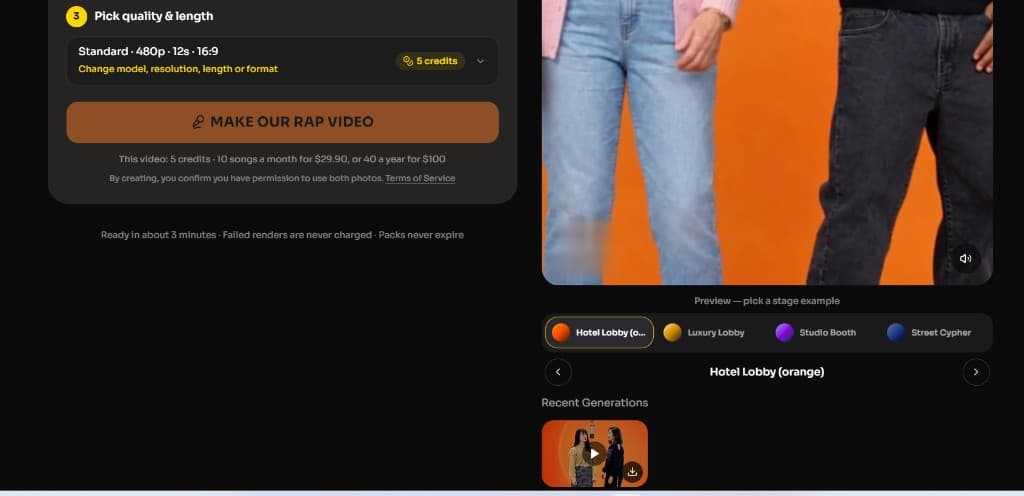
Processing takes a few minutes in the browser on phone or desktop—no install. Single packs cover about one standard clip; the Duo Pack ($29) covers roughly five songs worth of credits when you batch friend groups. That pricing model differs from Higgsfield’s monthly credit pools, so compare total cost for the number of duos you actually plan to ship this month.
Which workflow fits your goal?
| You want… | Better fit |
|---|---|
| Your face on the exact COLORS take with original motion | Higgsfield Genjutsu / motion transfer |
| Side-by-side control of models, prompts, and experiments | Higgsfield (general AI video suite) |
| Two real people animated together from photos | Hotel lobby ai (two-slot cast) |
| Orange booth without chasing a dead template link | Orange stage on Hotel lobby ai |
| Step-by-step trend help without third-party apps | How to do the Hotel Lobby trend |
Many teams prototype a higgsfield hotel lobby clip on Higgsfield to see if the gag lands, then rerun the same photos on Hotel lobby ai when comments ask where the second friend is. Pairing ideas—siblings, cofounders, pets—live in Hotel Lobby trend ideas.
Before you publish
- Consent. Only upload people who agreed to appear. Skip celebrities and strangers—you cannot claim a higgsfield hotel lobby render is “official” footage.
- Sensitivity. Takeoff died in November 2022; some fans dislike impersonation of the original pair. Cast yourselves or characters you own. Context on the song is in the Hotel Lobby song guide.
- Format. Generate 9:16 when TikTok or Reels is the destination so the hanging mic stays centered.
- Audio expectations. Orange booth exports carry the reference performance audio people recognize from the trend. If you need wholly original music, pick a non-orange stage or plan a platform sound swap knowing lips may not match a new track.
- Disclosure. Label AI-assisted edits when your platform requires it—a one-line caption note prevents confusion without killing reach.
- Quality check. Scrub the MP4 before you post. Teeth, mic alignment, and shoulder motion should track the beat; re-render with clearer photos if one face looks pasted.
Searching higgsfield hotel lobby is reasonable when you want Higgsfield’s toolbox. When the deliverable is a duo MP4 you can post tonight, start on the homepage: two uploads, stage selected, credits confirmed, download, caption, publish. Keep Higgsfield bookmarked for experiments; keep Hotel lobby ai for the booth clip both of you actually star in.